
This guide will help you understand how to efficiently use the SMS Report Module to monitor SMS interactions with guests and the associated costs. You will learn how to access the report, customize searches, and interpret the information presented in the table. Follow the steps described to ensure you make the most of this functionality.
- Navigate to Menu > Reports
- Click on SMS Report
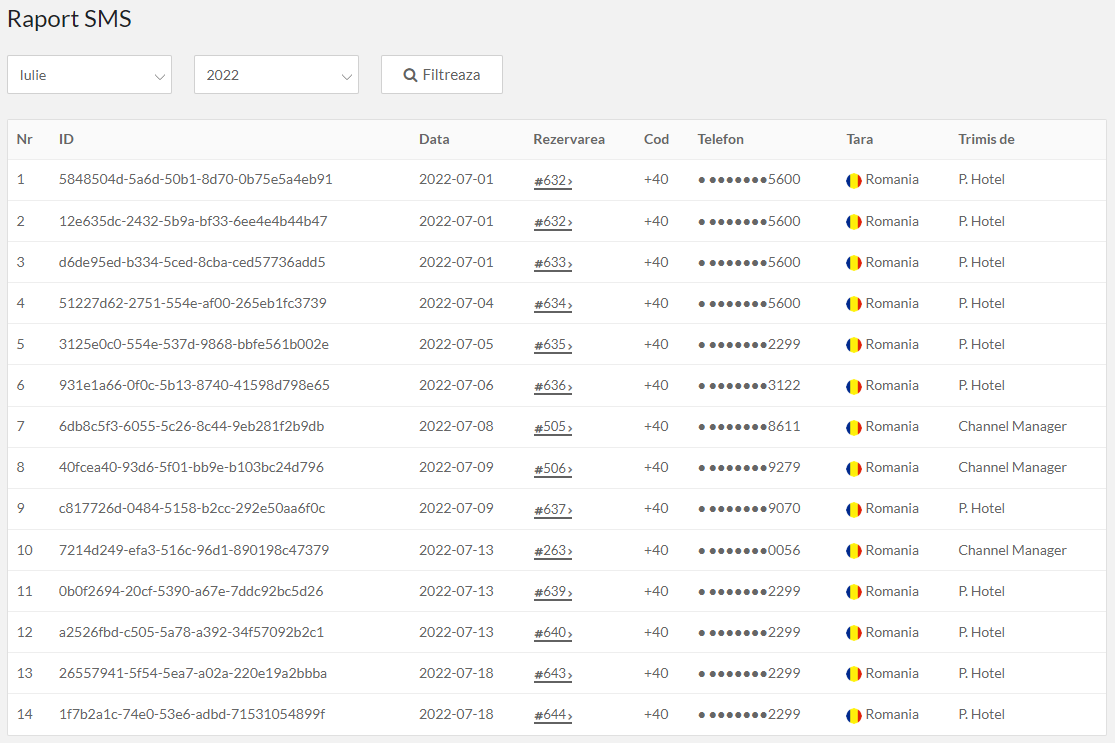
- Customize the search based on the month and year you want to view. The system will display a table with information about each SMS sent.
Here’s what each column in the table indicates:
- No.: Represents the order number.
- ID: The unique identifier of the SMS.
- Date: The date the SMS was sent.
- Reservation: The reservation for which the SMS was sent. Click the reservation number to access it.
- Code: The country code.
- Phone: The phone number.
- Country: The recipient's country.
- Sent by: The user who sent the SMS, if it was sent manually.
📌 Note:
Each SMS sent from the system costs €0.10, regardless of whether it is sent manually or automatically.
If the guest's phone number is not entered in their profile, the SMS will not be sent. Add the phone number and send the SMS manually.
Access the reservation, click the Send Mail & SMS button under the guest's name, and select SMS access Guest APP.
❗The total SMS costs will only be invoiced on the next bill if the total value of SMS sent exceeds €10. Otherwise, the amount will carry over to the next month, and the system will wait until the total exceeds €10 before issuing an invoice.
✅ Done! You’ve completed the information for this section!
